


How to Set Up a Multiregional Website for Better SEO
-
Author
Saurabh Garg -
Publish
November 20, 2024 9:48 am -
Read Time
6 Min

 Lets talk











Fill in the Form below for a no-string attached free technical discussion.
In today’s global digital landscape, businesses must cater to audiences across different countries. A multiregional website ensures you deliver relevant, localized content, improving both user experience and search engine rankings. This blog outlines actionable steps for setting up a multiregional website, leveraging best SEO practices to help your business grow internationally.
A multiregional website is a type of website designed to cater to audiences in different countries or regions by providing localized content or targeting specific geographical locations. For those wondering How to Get Search Results From Other Countries, a multiregional website is your answer. Unlike a standard website, which serves a broad, global audience, a multiregional website tailors its structure, content, and optimization strategies to enhance the user experience and search engine visibility for specific regions.
Multiregional websites are designed to target users in different countries or regions. Here’s why they are essential:
Selecting the correct URL structure is the foundation of a successful multiregional website. Your options include:
Recommendation: Use a structure based on your budget, technical expertise, and business
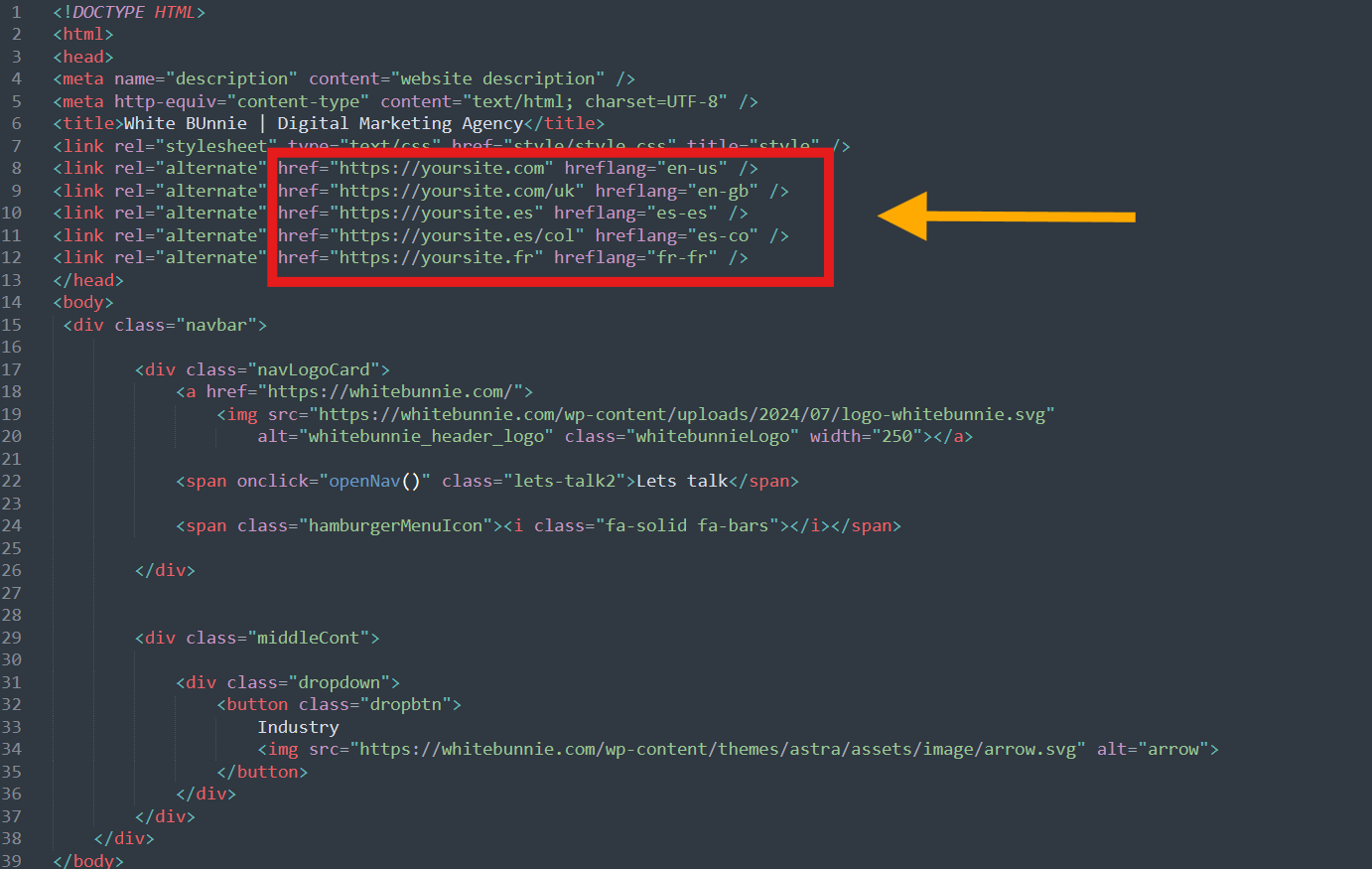
Hreflang tags inform search engines about the intended language and region for each webpage.
HTML
<link rel=”alternate” hreflang=”en-gb” href=”https://example.com/uk/” />
<link rel=”alternate” hreflang=”en-us” href=”https://example.com/us/” />
Google has changed the interface and removed the International Targeting option under Legacy Tools and Reports in Search Console.
Localized content resonates more with your audience. Translation alone isn’t enough; adapt your content for cultural relevance and user intent. While Small Business SEO Services typically focus on local markets, these principles apply equally to international targeting.
Beyond content, technical optimization is vital for better visibility. Our comprehensive Local SEO Services can help ensure your multiregional website performs optimally in each target market.
Use analytics tools to measure the performance of each region’s content. With the increasing importance of mobile devices, implementing Mobile SEO Services is crucial for international success.
A well-optimized multiregional website is the key to expanding your global reach. By choosing the right URL structure, implementing hreflang tags, and localizing content, you can improve SEO performance across regions. Follow these steps to create a seamless experience for your international audience.
Need help setting up your multiregional website? Our SEO Outsourcing Company provides expert solutions tailored to your business goals!

Saurabh Garg, the visionary Chief Technology Officer at Whitebunnie, is the driving force behind our cutting-edge innovations. With his profound expertise and relentless pursuit of excellence, he propels our company into the future, setting new standards in the digital realm.

If you run stores, clinics, salons or branches in more than one Indian city, the way people find you has […]
Read Post »
Content marketing is no longer a fad—it’s the backbone of any business hoping to stand out online in 2025. While […]
Read Post »
You see them all the time on Google: the “People Also Ask” (PAA) boxes. They pop up with questions related […]
Read Post »
Copyright © 2026 White Bunnie -All Rights Reserved



