


What is Data Thresholding in GA4 and How to Fix It?
-
Author
Saurabh Garg -
Publish
February 14, 2025 7:16 am -
Read Time
6 Min

 Lets talk











Fill in the Form below for a no-string attached free technical discussion.
Google Analytics 4 (GA4) has introduced several privacy-focused changes, one of which is data thresholding. It strengthens anonymity but also gives detailed reporting. Analysts who once relied on granular insights now find gaps in their reports. While this is beneficial for privacy compliance, it can cause issues for marketers and analysts trying to extract complete reports. As a result, it becomes challenging to track smaller audience segments or low-traffic campaigns. This also forces businesses to rethink how they interpret metrics.
As a result, analyzing smaller audience segments or low-traffic campaigns becomes increasingly complex, limiting granular insights.
GA4 introduces data thresholding as a privacy control and limits visibility when user identification becomes a risk. This affects reports when user counts are too low to maintain anonymity. It is most commonly triggered when using Google Signals or demographic data.
Example of Data Thresholding- If you filter a conversion report by location and the number of users from a specific city is minimal, GA4 may restrict access to that data. This results in missing metrics even lower than expected.
How It Appears:
There are a few key reasons why GA4 applies data thresholding:
| Reason | Description |
| Google Signals Data | If Google Signals is enabled, GA4 may apply thresholding to protect user privacy. |
| Low Data Volume | If the dataset is too small, GA4 withholds data to prevent user identification. |
| Sensitive Data | Reports containing demographics, interests, or location filters may trigger thresholding. |
| User-Scoped Data | Custom reports using User ID or device-level data may be subject to thresholding. |
 How to Detect Data Thresholding in GA4
To check if your reports are affected by data thresholding:
For better understanding of GA4 reporting and how to track user behavior, check out our detailed guide on tracking user behavior in GA4.
You cannot remove data thresholding completely but here are top ways to reduce its impact:
For more detailed steps, check our guide on excluding your own traffic from GA4 using IP filtering.

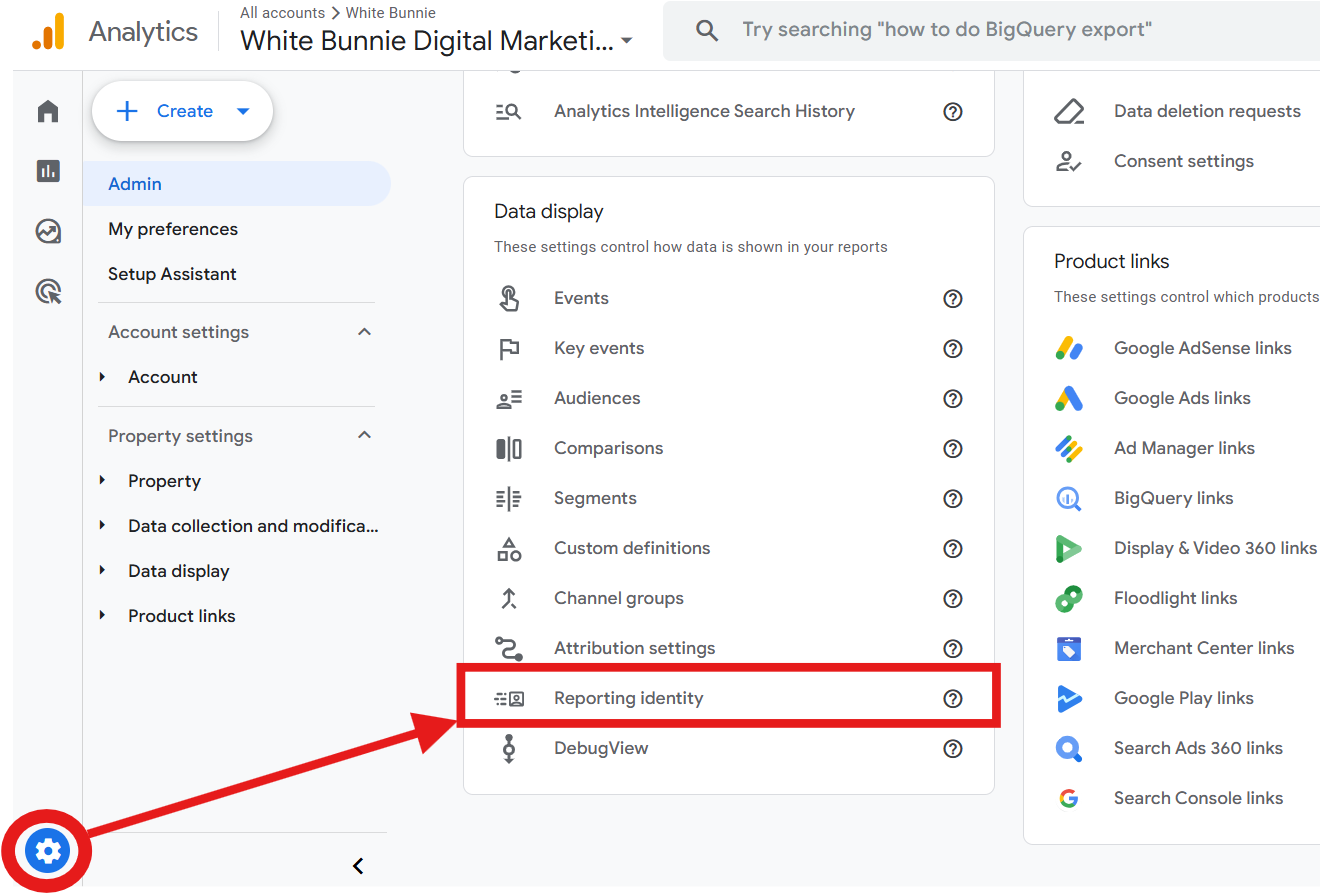
GA4 gives a lot of different reporting identities for controlling the way a data is processed:
| Identity Type | Impact on Data Thresholding |
| Blended (Default) | Uses Google Signals; higher chance of thresholding. |
| Observed | Uses User ID & Google Signals but still applies thresholding. |
| Device-based | Uses only first-party cookies; less thresholding. |
Steps to Change:
Google Analytics 4 allows you to export raw, non-thresholded data to BigQuery for advanced analysis.
Steps to Enable BigQuery Export:
This method bypasses thresholding since raw data is not affected.
Data thresholding in GA4 is a privacy-first feature that can limit data visibility in reports using Google Signals. While you can’t remove it entirely, you can mitigate its effects using the methods outlined above.
Key Takeaways:
If you’re managing GA4 reports for marketing campaigns, using UTM parameters is crucial for tracking performance accurately. Check out our in-depth guide on tracking marketing campaigns with UTM parameters in GA4.
With these fixes, you can get an accurate and actionable insight from GA4 without compromising privacy standards. Need Help with GA4 Implementation? If you can’t check GA4 reports and get precise data, our team of talented experts can help create a better setup. Get in touch today with White Bunnie!

Saurabh Garg, the visionary Chief Technology Officer at Whitebunnie, is the driving force behind our cutting-edge innovations. With his profound expertise and relentless pursuit of excellence, he propels our company into the future, setting new standards in the digital realm.

If you manage a website, you’ve probably heard the terms Core Web Vitals and page speed optimization being tossed around. […]
Read Post »
404 error is definitely not something new for many of you. You must have faced the issue at least once […]
Read Post »
To get your SaaS brand cited on ChatGPT and Perplexity, you need to do five things: build deep topical authority […]
Read Post »
Copyright © 2026 White Bunnie -All Rights Reserved